Showing posts with label Firefox. Show all posts

Sunday, 4 May 2014

Keeping Up With The Jones's

This week more than a couple of sites are reporting on the Firefox refresh, Australis. Both are also pointing out the similarities between this latest incarnation and a close rival; Google Chrome.

I've blogged before about preferring Chromium to Firefox and these reviews do nothing to persuade me that I'm wrong. Indeed, the only significant difference appears to be that the options menu in Firefox is now icon (rather than text) based: hardly, the height of innovation. Convergent, it seems, means emulating your competitors.

I may give it a look over the next few weeks, but it won't be at the top of my to do list.

Sources & References:

Monday, 20 May 2013

Bling for 13.10?

Joey-Elijah Sneddon has reported that Chromium is the likely replacement for Firefox in the 13.10 release of Ubuntu.

I haven't used Firefox for a while: I find it slow to open and flaky to use. In fact, the only time that I use FF now is when I'm testing changes made to the Komphix website from Bluefish. I'm not sure that it will ever be my favourite browser again as it once was.

Sources & References:

Wednesday, 17 August 2011

Sidejacking

Have you ever wondered how the script kiddies who often can barely read & write manage to hijack your Facebook or Hotmail account?

Well, it turns out that it's shockingly easy: in fact, I managed to learn how to gobble up someone else's cookie and hack their account by following just three links! No brute force or dictionary attacks necessary - all that's required is a laptop, a public WiFi hotspot, Firefox, and a copy of Firesheep.

The irony is that it is (or, at least should be) easy to foil such attacks. All three of the links that I followed are essentially arguing for the same thing - end-to-end encryption between server and browser that protects users from identity theft. Indeed, Eric Butler (the author of Firesheep) even claims that he only released his hacking tool to demonstrate the extent of the sidejacking problem.

"Websites have a responsibility to protect the people who depend on their services. They've been ignoring this responsibility for too long, and it's time for everyone to demand a more secure web."
Eric Butler via { codebutler }

The message should be obvious: whether you're using Facebook, Google, Hotmail, or a myriad of other services on the web, if you would rather that no-one else had access to your data, make sure that you are using a secure (https or ssl) link.

Sadly, I expect few people to heed this warning. After all, no-one bothered to turn on the security features released by Microsoft for its Hotmail service!

"For example, in July, eight months after Microsoft first offered HTTPS protection, the company revealed that only 2 million of the 500 million users of Hotmail had enabled the option."
Christopher Soghoian via Ars Technica

Sources & References:

Tuesday, 16 August 2011

A Night at the Opera

The news that Mozilla has released a new version of Firefox hasn't tempted me away from Chrome; but, something else has persuaded me to change my browser!

Recently, page loads in Chrome have got slower and slower and it seems that this is neither a new problem, nor is it attributable to a single reason. After enduring the rather cryptic sending request error message for a few days, I thought I'd take the opportunity to see how Opera performs on Ubuntu. This move isn't entirely a leap in the dark, I'm already a regular Opera user - it's the primary browser on my iPAQ hx2790!

I've always liked the speed dial page in Opera Mini and, in my opinion, text rendering has always been superior to Firefox. So, this weekend I downloaded Opera 11.50 and gave it a whirl on my Ubuntu machines.

It's taken a day or so to get used to the way the browser works and shortcuts aren't as intuitive as I would like. Moreover, online help is not as readily available as it is with other browsers and this dearth of expertize is probably a reflection of the minuscule market share (estimated at around 2.3%) that Opera enjoys. However, Opera is probably the quickest browser that I've used (particularly with the Turbo function enabled) and text rendering is as stunning on the desktop version as it is on the WinMob application!

If you are tempted to give Opera a try, here's a couple of tips:

  1. If you enable Speed Dial, use your mouse's centre button to open links in a new tab or window rather than than the current tab.
  2. Take a look at Opera's tutorial on mouse gestures - it could save you some time trying to set preferences.

Sources & References:

Sunday, 24 April 2011

Spit and Polish - Adding Chrome

My upgrade to Maverick a week or so ago resulted in some time spent reconfiguring my setup. One of the things I've decided to try is the Chromium web browser to see how it compares to Firefox.

So far I confess to being somewhat ambivalent to the browser. There's no doubt that it's much (MUCH) faster than Firefox 4.0 and the page rendering is vastly superior, but I have found the interface to be less intuitive and user-friendly than Firefox. I suspect that it's a sign of (my) age when a new interface grates on the nerves of the user: after all, browsers are really just delivery vehicles and Chromium does focus the attention on the page content rather than the bling that surrounds the application! However, it took me a while to figure out rss feeds and bookmarks although, once I'd done my homework, importing data from Firefox was simplicity itself.

You can install Chromium in 10.04 and 10.10 from the Ubuntu Software Center.

Thursday, 21 April 2011

Firefox Sync

One of the problems with running multiple computers is syncing your browser's bookmarks, passwords, preferences, history, and tabs. Well, Firefox 4 comes with an add-on that allows you to sync this information across multiple devices (running Firefox!).

It's more convenient than backing up bookmarks because the service allows you merge data on different computers. Moreover, the data is encrypted on your PC before it's uploaded to the server, so data such as passwords should be safe.

Firefox Sync works with Firefox 3.5 and 4.0.

Sources & References
Mozilla Firefox Sync 1.7
Mozilla Privacy Policy

Sunday, 27 February 2011

The British Obsession

Being British, I'm obsessed by the weather!

Forecastfox Weather is a great add-on for Firefox.
"Get international weather forecasts from AccuWeather.com and display them in any toolbar or statusbar with this highly customizable and unobtrusive extension."
Using your cursor to hover over the various icons in Firefox's status bar, activates information pop-ups.


You can set your location, dictate the number of forecast days, and configure the add-on to display information in the units of your choice. Excellent!

Tuesday, 22 February 2011

Firefox Add-ons

One of my favourite Firefox Add-ons is Toolbar Buttons.

Michael Buckley (Codefisher.org) has just released Toolbar Buttons 1.0 with a few changes and some new icons. This is always one of the first things that I install (along with All-in-One Sidebar) - if you haven't anything more pressing, give it a go.

Saturday, 22 January 2011

Fixing Firefox (Again)

OK, this isn't really a fix, more of a tweak!

My recent struggle to find and install an English UK dictionary/thesaurus in Open Office prompted me to pay more attention to the spell checker in Firefox. I have noticed when completing dialog (yes, I know that the English spell dialog as "dialogue" but this relates to computer dialogs!) boxes (or drafting blog posts) that Firefox checks my spelling for me: unfortunately, it checks my spelling in American English and not British English. Not to worry though, it's easy to fix this:
  • Nip off to the Firefox Dictionaries and Language Packs Add-Ons page and navigate to the English (British) Dictionary file link
  • Click Install Dictionary
  • Restart Firefox when prompted
  • In any dialog box, right-click and select Languages and check the English/United Kingdom option
You can also do this from a dialog box! Right-click anywhere in the dialog box and select Languages and then Add Dictionaries.... Then follow the above instructions to install and load your default language.

Sunday, 9 May 2010

Fixing Firefox

If you want to load the latest version of Firefox onto your Ubuntu system, you can't use the official repositories as these only hold the latest version of Firefox available at the time of your version's release (source: SourceForge). Happily, there is a way to install the latest version and get security updates and bug fixes as part of your normal update routine: I won't replicate the step-by-step instructions here, you can follow them on the Ubuntuzilla project page.

However, once you download Firefox, you may not be particularly impressed with how Ubuntu renders web pages. You can fix this by adding Microsoft's TrueType fonts to the ~/.fonts directory in Ubuntu. Open a terminal and type (or copy & paste) the following:

sudo apt-get install msttcorefonts

Input your password at the prompt and the system will download and install your fonts. If you'd rather not use the terminal, you can use the Synaptic Package Manager to achieve the same result: from System → Administration → Synaptic Package Manager and search for the libfreetype6, ttf-freefont, ttf-liberation, ttf-opensymbol and ttf-mscorefonts-installer packages.
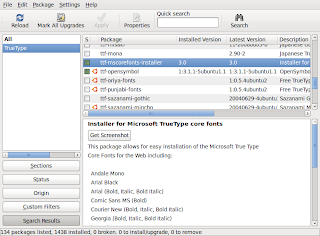


Next, you need to force your font information cache files to refresh in order to make the fonts available. You can either log out and log back in or run the following command in the terminal:

sudo fc-cache -f

Now you can change fonts in Firefox: From the Edit menu select Preferences and then the Content icon. You can change the selected font from there and see the changes in real-time. The good news is that installing these fonts has implications system-wide including other applications such as OpenOffice.

If you spend a lot of time in front of your screen, this is a life-saver.