Showing posts with label Applications. Show all posts

Sunday, 19 October 2014

Fixing mp3 Track Duration Errors

I recently converted my music collection to the mp3 format; however, whilst the playback quality is excellent, many of the tracks had erroneous track duration data. This wasn't a particular problem until I copied some of the tracks to my phone which started crashing while playing music and I began to suspect the duration error as the culprit.

Changing duration is not as straightforward as fixing tags (easily achieved using EasyTAG) but there is a great app in the Software Center for doing just that, MP3 Diags.

Track duration errors are caused by missing, incomplete, or corrupt variable bitrate (VBR) headers:

"There are 3 kinds of VBR headers: Xing, LAME, and VBRI. MP3 Diags identifies files having an incorrect or missing VBR header, and allows you to create Xing headers, should you need to." Source: MP3 Diags, MP3 Introduction

Warning, following this advice may corrupt your music files - backup first!

Despite the rather dire warning above, I've experienced no data loss or corruption (at least, none that I've found) and this great app has repaired all of my track duration errors and one or two other issues as well!

If you're using Ubuntu or one of it's derivatives, the best installation option is the Software Center. Open the Software Center and search for mp3diags - don't put a gap between mp3 & diags or you'll only be offered the MP3 Diags documentation. Simply install as usual.

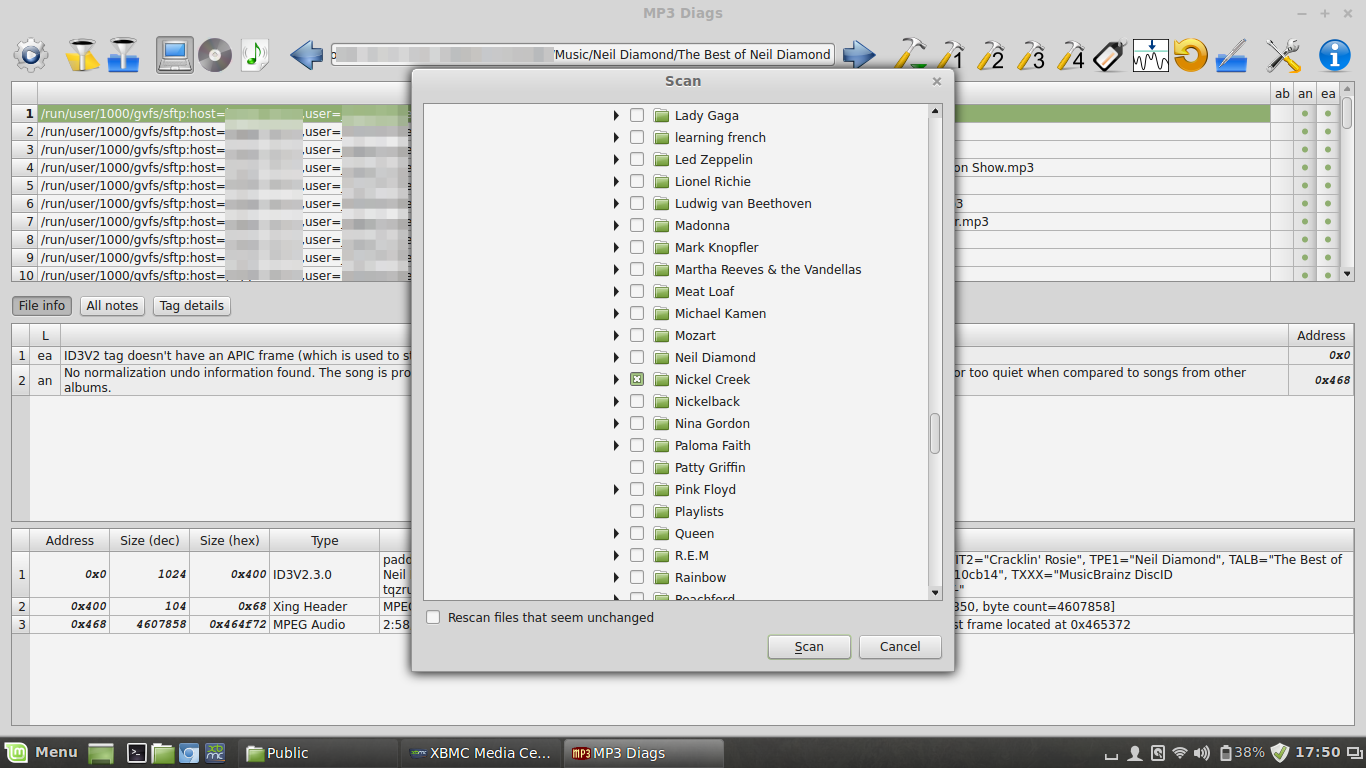
When you open the app you must scan your files for errors. Just click the gear icon (1st on the left of the toolbar) and the browser will open. You can also scan remote files if you have mounted them using SSH: in Mint the route is a little convoluted, try:

run/usr/1000/gvfs/sftp:host=server,user=user/

...and then look for your music directory. Select your directory and then hit the Scan option. This can take several minutes on a single remote directory (album), so patience will be needed if you have a large music library with lots of errors. My repairs took over a week on a modest (3,500 track) library.
If the scan reveals any Xing errors, repair them by clicking the single transformation icon (a hammer with a green arrow) and selecting the Repair VBR data option.

Sources & References:

Sunday, 5 October 2014

Fixing The Internal Microphone - Presario CQ60

It's taken weeks of Googling, but I've finally found a fix for the internal microphone on the Presario CQ60.

I had no luck with the various fixes that I found online until I came across this post which, if I've understood it correctly, suggests that the problem with the internal microphone on the CQ60 is not a software issue but a hardware problem. As I understand the OP's problem, the kernel allocates the wrong pin id at boot: the workaround turns out to be surprisingly simple.

First we need an application developed by David Henningsson at Canonical. It's called HDAJackRetask and it was originally developed to turn unused microphone jacks into additional headphone jacks - brilliant! It's now part of the alsa-tools-gui, so there's no need to add a new repository. Open a terminal and do:

sudo apt-get install alsa-tools-gui

Alternatively, you can download it from the Software Center or Synaptic. When prompted about the additional space (in the terminal method), type y and hit enter.

Open HDAJackRetask from the Main Menu (in Mint Cinnamon it's under Sound & Video). Select your sound card and then, under the Options panel, check the Show unconnected pins option. In the Pin configuration section, look for your Internal Mic, Riser entry, click the Override checkbox, and set the spin button to Not connected.

Next, look for the Pin ID: 0x1d, check the Override checkbox, and the use the spin button to select Internal mic. Now click the Apply now option and test your microphone. If all's gone well, it's time to make this a permanent change: click the Install boot override. You'll see the following message dialog: click OK and reboot.

Sources & References:

Sunday, 29 June 2014

Eric The Half-A-Bee

Over the last couple of days, I've been using Allen Downey's excellent resources for brushing up my Python skills. For my interpreter, I use the Eric Integrated Development Environment and it works flawlessly on the laptop. However, I couldn't get it to install on the Dimension 8400. Summoning the application from the terminal resulted in a segmentation fault.

Fortunately, if you experience the same problem, you can install the program manually:

Download the latest stable version from the Eric SourceForge page to your Download folder. Select the latest version, and from the following directory, select the .tar.gz file. Then, when your file has downloaded, navigate to the file in the file manager of your choice, right-click the file and select the Extract Here option.

Open a terminal and change your directory to the extracted folder:

cd /home/[user_name]/Downloads/ericversion_number

Now, install the program with:

sudo python install.py

That's it! Now you can enjoy Monty Python's track, Eric the Half-A-Bee.

Sources & Reference:

Monday, 23 June 2014

Quick Tip - Fix the Flicker

If you're using Cairo Dock on Mint 17 & you are witnessing flickering when you hover the mouse over the dock, the fix is simple!

Open the Startup Applications dialog (Main Menu > Preferences > Startup Applications), select the Cairo-Dock entry, & click Edit.

Amend the Command field to read:

cairo-dock -o

This forces Cairo Dock to use the Open Graphics Library at startup and should resolve any flickering problems.

If this doesn't do the trick, try using the Cairo backend:

cairo-dock -c

Sources & References:

Tuesday, 6 May 2014

Are Webapps All They're APPed Up To Be?

It may be me, but the whole concept of webapps is a little vague. Just saying that:

" It [webapps] will enable Ubuntu users to run online applications like Facebook, Twitter, Last.FM, Ebay and GMail direct from the desktop. Making web applications behave like their desktop counterparts improves the user experience dramatically; it's faster and it reduces the proliferation of browser tabs and windows that can quickly make a desktop unmanageable."

...doesn't really tell you much about what webapps are and what they do. Neither does there seem much enlightenment elsewhere on the Internet.

So, for the uninitiated, webapps are web pages that don't need a browser to run. The operating system treats these browserless web pages (almost) like any other application; for instance, you can tab through open apps, lock quick-launch icons to the Launcher, and use the HUD system to search them. So, if you want an application that logs you straight into your GMail or Twitter account without first having to start your browser, select your bookmark, and sign in - webapps are the perfect answer.

Webapps are certainly fast and accessible. They're great for posting those Twitter updates, rattling off a quick email, or editing web-based documents.

So far, so good. But (and it's a big but) this just moves the problem of browser tab proliferation from the browser to the desktop, so the claim that it makes web/desktop integration more manageable is moot. Moreover, the dearth of developed webapps hardly makes the concept of the web browser defunct. I use the word developed loosely: for example, whilst the GMail webapp gets you to your inbox quickly, when you get there, you can't click on hyperlinks in messages and there's no new mail notification integration on the Unity launcher. Suddenly, the promise of a dramatic improvement in speed and user experience, doesn't quite match the practise.

There's more trouble: whilst webapps play nice with Firefox, integration with Chromium (supposedly supported) doesn't work in 14.04 (at least, not for me!). If you want Chromium to be your default browser, you'll have to access your webapps from the Launcher, Dash, or message indicator on the top panel.

Conclusion

Reading between the lines, webapps are an artefact of convergence. Single application icons make sense on small form-factor devices where screen real estate and battery life are at a premium: after all, this is how iOS & Android mobile systems function already.

If true convergence is still an overarching strategy, it makes sense to focus development efforts on a single channel that crosses multiple platforms and if Canonical is serious about developing a mobile version of Ubuntu, this technology will be essential to its success.

Nonetheless, at the moment the desktop versions of these applications are rudimentary and it's not clear what, if any, development work is going on. Clearly, the current mobile OS are far more advanced than the Ubuntu webapps. That said, for q&d access to some of your favourite applications, webapps are a useful addition to the Ubuntu desktop.

Sources & Resources: